Google Ad Grants, step by step.
This guide walks you through everything that matters: eligibility, how to apply for the Google Ad Grant, budgets, campaign structure, policies, and conversion tracking. Get it right and you can turn up to $10,000/month in free Search ads into real reach for your mission.
A real asset, with rules.
The headline numbers behind the world's largest in-kind advertising program for nonprofits.
Running for two decades
The Ad Grants program has supported nonprofits since 2003 — it isn’t going anywhere.
In free advertising given
More than nine billion dollars of in-kind Search ads delivered to date.
Nonprofits served
Over 115,000 organizations worldwide have used the grant to grow their reach.
Per month, per org
Qualified nonprofits receive up to $10,000 monthly in Google Search advertising.
Suggested daily budget
The monthly grant works out to roughly $329 a day across your campaigns.
No expiration date
There’s no need to reapply. Keep the grant by staying compliant with the policies.
Ten topics, in order.
From eligibility to ongoing optimization, jump to any section.
What is the Google Ad Grant?
An overview of the program, its purpose, and how it supports nonprofits.
Application process
The two-step path: apply to Google for Nonprofits, then activate the grant.
Campaign creation & optimization
Structuring campaigns, choosing keywords, and writing copy that converts.
Account management & compliance
The grant policies that keep your account active and in good standing.
Performance monitoring & reporting
The metrics and tools that show whether the grant is working.
Program updates & resources
How to stay current and where to get help when you need it.
01
What is the Google Ad Grant?
Since its establishment in 2003, the Google Ad Grants program has provided over $9 billion in free advertising to more than 115,000 nonprofit organizations. The Google Ad Grant for nonprofits lets eligible organizations advertise on Google at no cost. Qualified organizations can receive up to $10,000 per month of in-kind advertising to promote their missions and initiatives by appearing at the top of Google search results.
These advertisements take the form of Google Ads. One of the major benefits of the grant is that it does not have an expiration date, and there is no need to reapply. But the organization must maintain good standing to keep benefiting from the program.
02
Eligibility criteria
To find out whether your nonprofit is eligible, you can take Elevation’s Google Ad Grant eligibility quiz. We’ll walk you through a series of questions to determine whether we believe you’re likely eligible before you apply.
The key eligibility criteria relate to the nature of the organization (requirements to apply to Google for Nonprofits) and to the website (requirements for the grant itself). For Google for Nonprofits, your organization must not be:
- A school, academic institution, or university
- A hospital or healthcare organization
- A governmental entity or organization
- And it must be a registered 501(c)(3) in the US (other countries have their own equivalents)
Pro tip
To qualify, your organization also needs a website that meets the Ad Grants website policy: it must be high-quality, secure (HTTPS), and must not have commercial activity as its main purpose. We also recommend stating your nonprofit’s mission clearly.
03
Application process
The application process has two steps. First you apply to the Google for Nonprofits program. Then, once you’ve been accepted, you apply to activate the grant. Step by step:
- Make sure your nonprofit is qualified: review the eligibility requirements or take the eligibility quiz.
- Visit the Google for Nonprofits website and click “Get Started.”
- Complete the Google for Nonprofits application (about 10 minutes). If you’re already registered with Percent you can use an authentication token to speed things up; if not, have your organization’s name, address, and EIN ready.
- Watch the inbox of the contact email you provide. Percent will reach out to verify your nonprofit status. Your IRS 501(c)(3) letter of determination is usually all that’s needed.
- Once approved, open the Google for Nonprofits portal and choose to activate your Ad Grants account. You’ll provide your website, details about your current marketing, and answers that demonstrate your understanding of the grant policies (about 15 minutes).
- Keep an eye on your email. An invitation to the account usually arrives in 2–5 business days.
- You’re approved. The next step is to set up your campaigns and get the ads running.
04
Grant amount & budget management
The grant is equivalent to $10,000 per month in Search advertising on Google Ads, but budgets in Google Ads are set as daily amounts. So your daily campaign budgets should total roughly $329/day. Many nonprofits start with three campaigns at about $110 each.
You spend the budget by paying for clicks to your website. A typical cost per click is around $2.00, though this varies a lot by sector. Keep an eye on your average cost per click, because it determines how much of the grant you can use. New accounts rarely spend the full $10,000 in month one; it takes optimization to find the right keywords.
The good news: $10,000/month is the maximum, and spend adjusts automatically. You never have to worry about going over the amount the grant provides.
05
Ad campaign creation & optimization
Most nonprofits new to the program start with three campaigns, usually variations of Brand Awareness, Programs / Services, and Get Involved. Campaigns should map to general groups of information on your site, while specific ad groups should match specific landing pages.
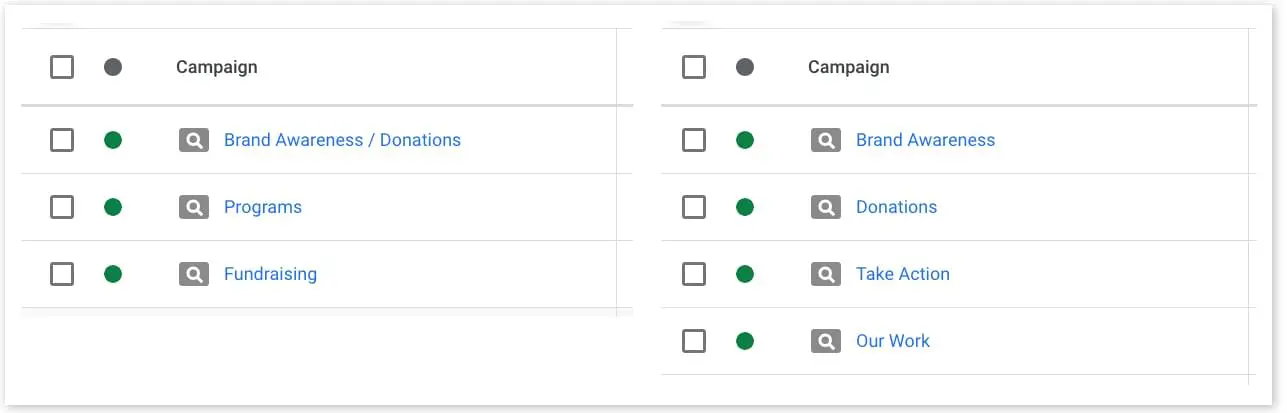
A Brand Awareness campaign might include an ad group that brings people to your homepage, plus ad groups tied to blog posts that establish your organization as a thought leader, all aimed at your community’s general public. A Programs and Services campaign should point ad groups at landing pages describing your work, for the people who could benefit from it. A Get Involved campaign can connect potential donors and volunteers with the right pages for their needs.
When selecting keywords and writing copy, keep those audiences in mind: think about what someone with that intent would search for, and make sure those keywords appear in your copy. To optimize, ensure your ads maintain the minimum click-through rate (CTR). If CTR falls below the threshold, it’s a sign to revisit your keywords or copy.
06
Ad policy guidelines
A few policies govern what you can advertise and how you can talk about certain topics. These matter most for nonprofits working in sensitive areas.
Addiction services
Many nonprofits do vital work in addiction services, but they often have difficulty using the grant because of restrictions on how advertisers can discuss addiction. Some may be eligible for a certificate to use these terms, though the application carries a cost. If this is your space, talk to an expert who can find compliant ways to use the grant and guide you through certification.
Healthcare & medical terms
Even if you’re not a healthcare provider (remember, providers aren’t eligible), working in the healthcare sector can trigger limitations on landing pages that mention prescription drugs or other medical terms. Raising awareness of a rare disease is a common example. If that happens, you can apply for certification on the grounds of being a well-recognized nonprofit.
Events & ticket sales
Nonprofits promoting events that require ticket sales must register to do so. Publish the ad well ahead of the event, and if it’s disapproved, follow the prompts to submit the required registration information.
07
Conversion tracking & measurement
Conversions are the significant actions you want people to take. For nonprofits, that commonly means making a donation or registering for an event. They should also include engagement signals along the way, like newsletter sign-ups or interacting with key content.
Many of these actions are already tracked in Google Analytics 4; import them into Google Ads by marking them as conversions and connecting the accounts. Many donation, donor-management, email marketing, and event platforms also offer ready-made GA4 integrations. Check the tools you already use.
For deeper reporting it’s often worth consulting a professional. At Elevation we prioritize conversion tracking in both setup and reporting (the campaigns we’ve managed have generated 1M+ mission-aligned visitors), so the people who click your ads are also taking the actions you hope for further down the funnel.
08
Account management & compliance
The grant has no fixed term and no expiration date, but to keep it you must stay in compliance with the grant policies. An Ad Grants account also behaves differently from a regular Google Ads account, so keep that in mind when managing it.
Grant policies to maintain
- Maintain a Click-Through Rate (CTR) of 5% or higher
- Use geo-targeting
- Use sitelink, callout & structured snippet extensions
- Keep valid conversion tracking in place
- Run at least two ad groups per campaign
- Avoid single-word keywords (except your org’s name)
- Avoid overly generic keywords
- Keep a quality score greater than 2
- Use smart bidding (Maximize Conversions)
- Log in at least once a month
- Make changes at least every 90 days
- Respond to Google’s annual survey
You must also meet the ad policy guidelines above. When optimizing, remember that Ad Grants accounts can’t use remarketing or audiences, and their auctions run after the regular Google Ads auctions, so you may need to be more creative in keyword research to find terms you can compete for.
09
Performance monitoring & reporting
We recommend a tool like Looker Studio to process your campaign performance. It’s free, provided by Google, and offers public templates to get you started.
Top reporting priorities are the metrics that determine grant maintenance: click-through rate (CTR) and conversion rate (CR). Most organizations also want to spend as much of the grant as possible (cost) while keeping a low average cost per click (CPC). Clicks and impressions matter too: they tell you whether your ads are being shown and clicked.
When reporting, look beyond the numbers. Dig into the content to make sure what’s shown still reflects your organization, and that the visitors arriving from your ads remain relevant to what you offer.
10
Program updates & resources
Stay attentive to your email and to notifications in Google Ads so you catch program and platform changes. Google Ads and Google Analytics change often. Checking for updates lets you optimize accordingly.
Google offers help through its Help Center, with chat, email, and phone support, including a team dedicated to Ad Grants accounts. And you can always rely on an agency like Elevation, which has managed $5.5M+ in Ad Grant budgets for nonprofits, to keep your account current and flag changes your organization needs to respond to.

Samantha specializes in marketing and communications for nonprofits, with a deep understanding of the unique challenges they face, and a knack for meeting organizations of any size where they are in resources and knowledge. She has wide experience in Google Grant management, analytics, social media, and SEO.
Answers, up front.
Most registered 501(c)(3) organizations qualify, with exceptions including governmental entities, hospitals and healthcare organizations, and schools or universities. You’ll also need a high-quality, secure website. The fastest way to check is our eligibility quiz.
Up to $10,000 per month in free Search ads, which works out to a daily cap of about $329. Spend adjusts automatically, so you can never exceed the monthly amount the grant provides.
Usually for inactivity, falling below the 5% click-through-rate rule, missing conversion tracking, or policy violations. Active, expert management keeps the account compliant and in good standing.
Find out if you qualify.
Take the two-minute eligibility quiz, or book a call and we’ll map the grant to your mission and budget.